esim
eSIM Check: Is the Fairphone 4 eSIM compatible?
Is the Fairphone 4 eSIM capable?
The Fairphone 4 is eSIM capable, allowing users to forgo physical SIM cards. Setting up an eSIM is done through the settings under "Network & Internet" and "Mobile network," where users can activate their eSIM by scanning a QR code or manual entry.
Setting up your eSIM from BuddySIM is conveniently done via QR code scan.
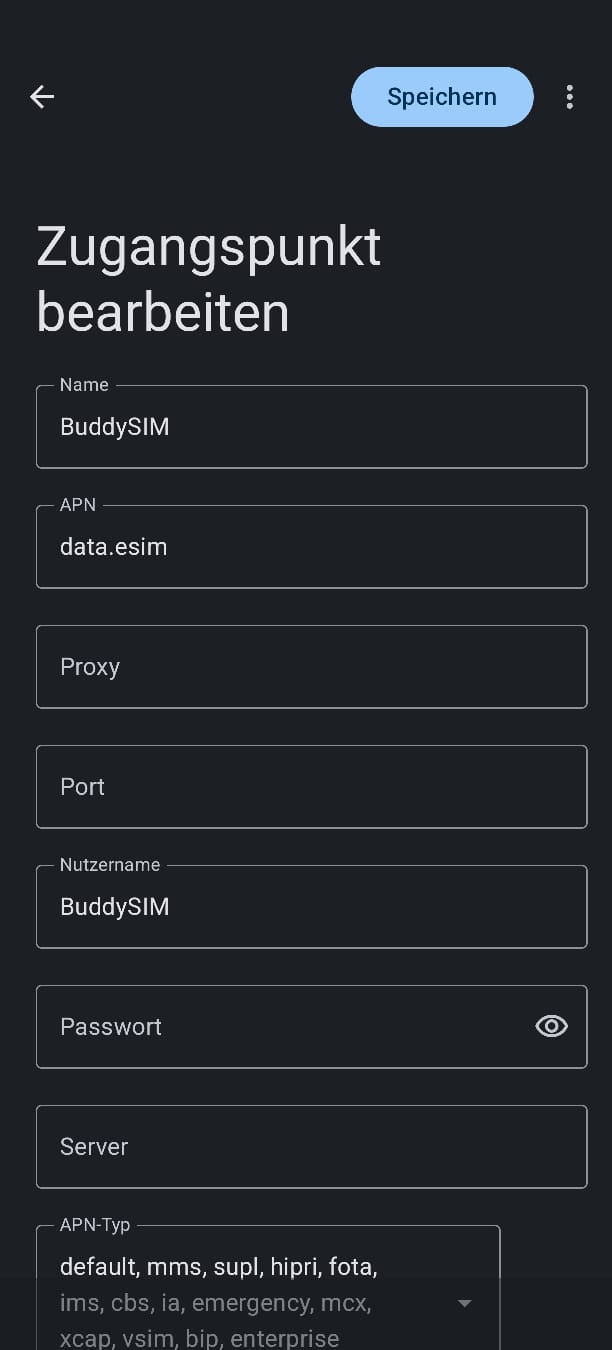
Note: For some eSIMs (depending on the destination country), the Fairphone 4 does not allow automatic APN.
An APN (Access Point Name) is the access configuration your smartphone needs to connect to your provider's mobile data network.
After activation, please go to "Manage eSIM" → "Edit Access Point" and manually enter:
- APN: data.esim
- Username: BuddySIM
- Password: (leave blank)