

How to Find the ICCID of Your eSIM – A Step-by-Step Guide
In the world of mobile communications, the ICCID (Integrated Circuit Card Identifier) is one of the most important pieces of information you should know, especially if you use an eSIM. The ICCID is a unique number that identifies your SIM card, and it is often needed to activate your eSIM, solve technical issues, top up your eSIM, or check your balance. In this blog post, we explain how to find the ICCID for your eSIM on different devices and platforms. 💡 If you deleted your order confirmation, this is also how you can find your ICCID again!
What is the ICCID and why is it important?
The ICCID is a 19- to 20-digit number that uniquely identifies every SIM card worldwide. It contains information about the country of origin, the mobile network provider, and the individual SIM card. For eSIMs, the ICCID is just as important as it is for physical SIM cards, because it is often used to activate or manage the eSIM.
How to find the ICCID of your eSIM
1. On iPhones and iPads
- Step 1: Open the “Settings” app on your iPhone or iPad.
- Step 2: Go to “General” and select “About”.
- Step 3: Scroll down until you see the “ICCID” section. This is where the number for your physical SIM and, if applicable, your eSIM is displayed.
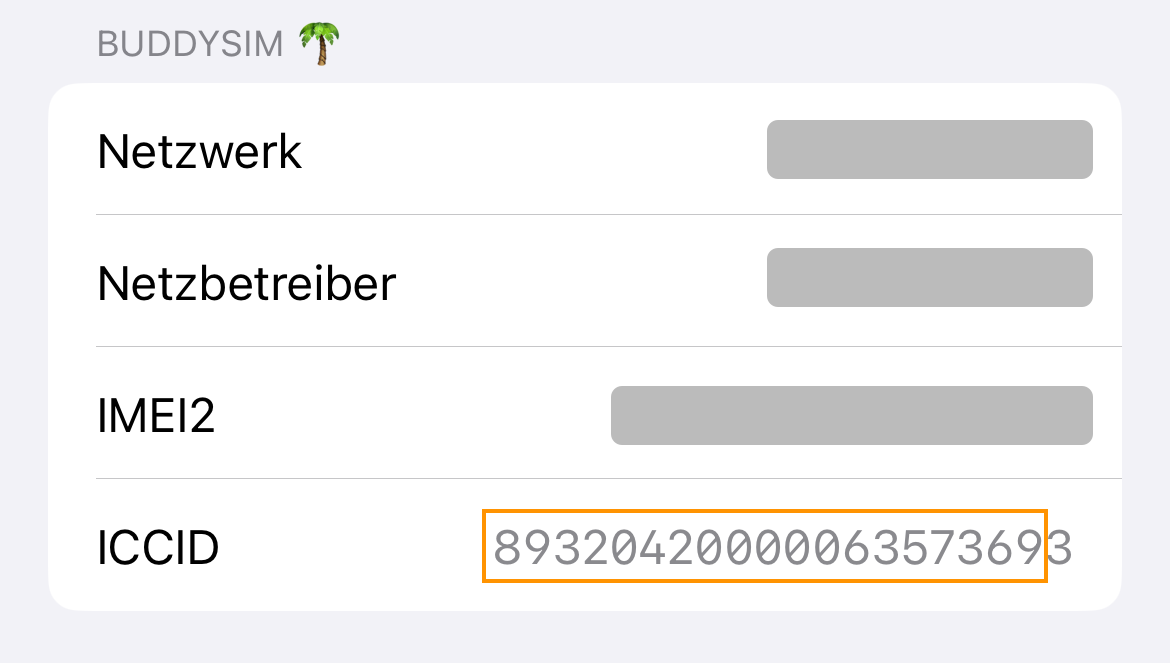
Important: On iOS, the final digit is not part of your ICCID.
Tip: If you have multiple eSIM profiles on your device, they are listed separately under “Mobile Service” in Settings. Tap the relevant profile to see its ICCID.
2. On Android devices
Method 1: Via the dial pad
- Step 1: Open the Phone app on your Android device.
-
Step 2: Enter the following code instead of a phone number:
*#06#.
Note: This will not make a call and will not incur any costs.
As soon as you press the final # key, a window with “Device information” will appear on your screen. You will find the ICCID at the very bottom of this window.
Method 2: Via Settings
- Step 1: Open the “Settings” app on your Android device.
- Step 2: Navigate to “About phone” or “About device”.
- Step 3: Look for “Status” or “SIM status”. Here you will find the ICCID of your SIM card or eSIM.
Note: The menu structure may vary slightly depending on the manufacturer and Android version.
Whether you use an iPhone or an Android device, the steps above will help you find your ICCID quickly and easily. If you have any further questions or need support, the BuddySIM team will be happy to help. ❣️
