
Is the Xiaomi 13 Lite eSIM capable?
The Xiaomi 13 Lite is eSIM capable, allowing you to forgo a physical SIM card. The eSIM can be added via the settings under "Network & Internet" or "Mobile network" – either by scanning a QR code or by manual entry. Setting up your BuddySIM eSIM is conveniently done via QR code scan.
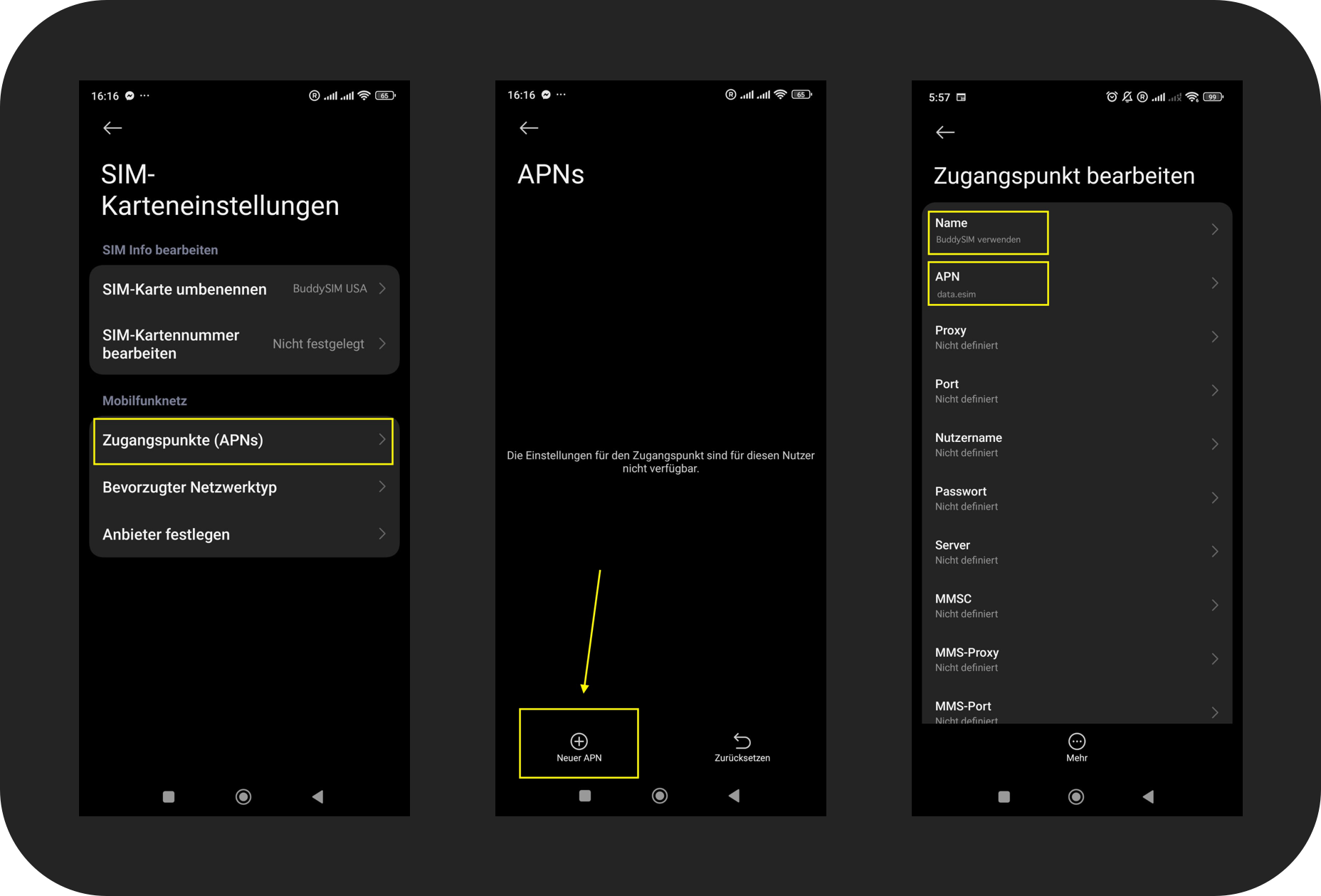
Note: For some eSIMs (depending on the destination country), the Xiaomi 13 Lite does not allow automatic APN.
An APN (Access Point Name) is the access configuration your smartphone needs to connect to your provider's mobile data network.
After activation, please go to "Manage eSIM" → "Edit Access Point" and enter the following manually:
- APN: data.esim
- Username: BuddySIM
- Password: (leave blank)
Technical details
How to set up your eSIM
Check compatibility & buy eSIM
Make sure your Xiaomi 13 Lite supports eSIM, and buy your eSIM in the BuddySIM shop.
Install eSIM
Settings → Connections → SIM manager → Add eSIM → enter the activation details from your email or scan the QR code.
The eSIM's mobile data only activates in your destination country — before that an error message may appear. That's normal, since the data is intended for your destination only.
Enable data roaming & select line
In your destination, go to Settings → Connections → Mobile networks, turn on data roaming and select the BuddySIM eSIM as your line for mobile data — done, you are online.
Download the BuddySIM app
Manage your eSIM, keep an eye on your data and top up any time — right on your Xiaomi 13 Lite. Free for iOS & Android.


How much data do you need?
Estimate your usage for your trip – and find the right plan for your Xiaomi 13 Lite.
All values are estimates – actual usage depends on how you use your device. How much data do I need?
Frequently asked questions
What is an eSIM?
An eSIM (embedded SIM) is a digital SIM card already built into your smartphone. You no longer need to insert a physical SIM card – everything works digitally via QR code.
Can I use my regular SIM card at the same time?
Yes! Your Xiaomi 13 Lite supports dual SIM. You can use your regular SIM card alongside the eSIM – perfect for travelling or to separate personal and business numbers.
How long does activation take?
The eSIM is activated within seconds. Right after purchase you receive the QR code by email and can scan and use it immediately.
Does BuddySIM work worldwide?
Yes, BuddySIM offers eSIM data plans for over 190 countries worldwide. Just choose your destination and stay connected anywhere.
Do I need a new number?
No! BuddySIM eSIMs are data-only plans. You keep your existing number on your physical SIM card and use the eSIM just for mobile internet.
